kinora 中文/EN Download

Generation · Library · Retargeting · Refinement · Agent tools

From a motion idea to robot motion you can review, edit and export.

Kinora brings motion generation, search, preview, retargeting and refinement into one workspace. The desktop client connects to your team's server, which does the generation, editing and retargeting work, so the features available depend on that server's configuration and your account. Gadget's command line and MCP tools bring the same workflow to the agents you already use.

macOSWindowsLinuxSelf-hosted serverCLI / MCP

Download the desktop app View on GitHub Desktop 0.7.0 · prebuilt, ready to install
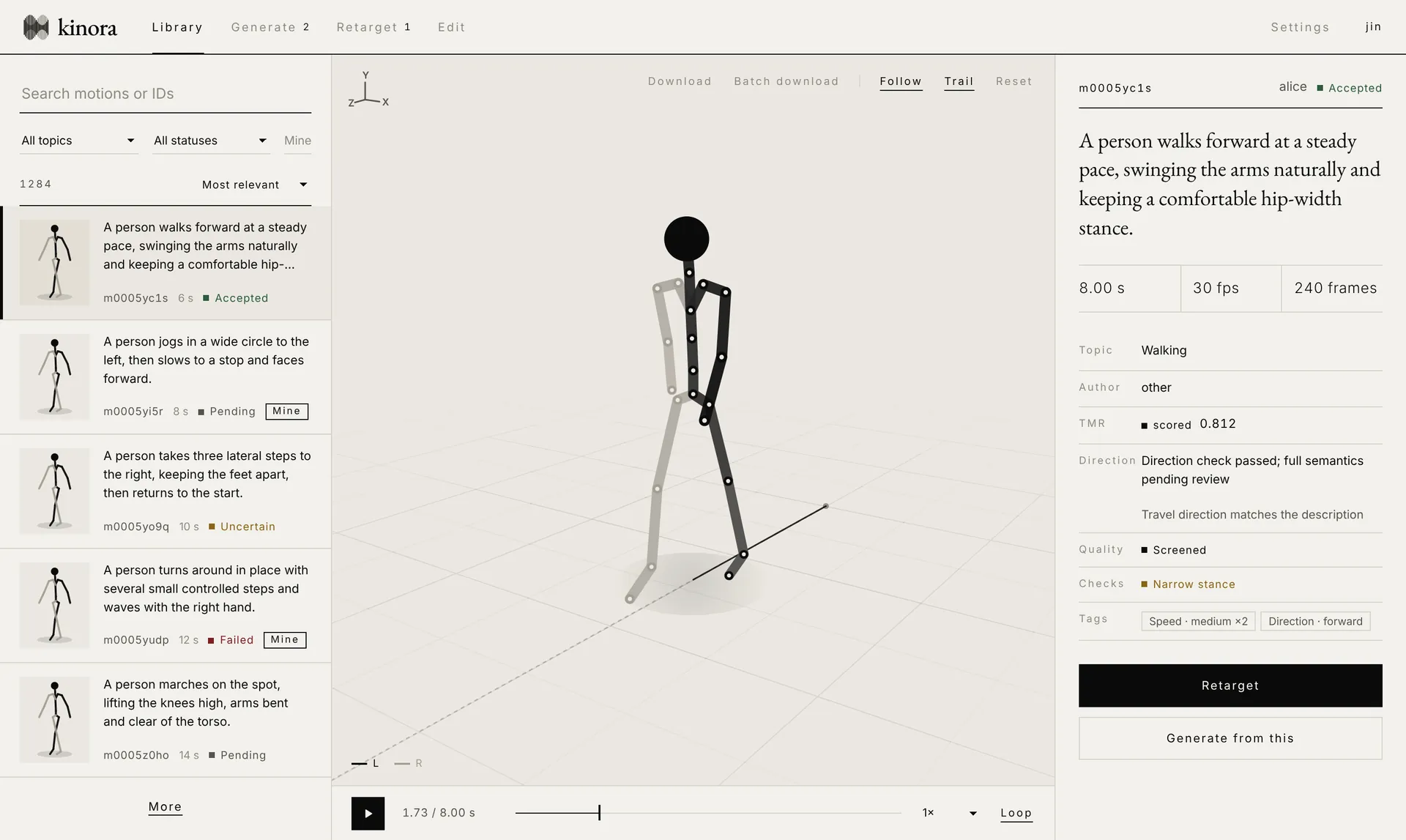
Kinora desktop library: motion list with thumbnails on the left, a 3D skeleton preview with the root trail in the middle, review, direction and quality details on the right

Library: search by description or ID, preview the skeleton in 3D, and read review and quality details side by side.Illustrative UI · demo data

Workflow

One motion, from description to delivery

  1. 01Generate

    Describe a single-person motion in a sentence. The server rewrites the prompt, or you submit the English text as is; jobs show their queue position and progress.

  2. 02Search & review

    IDs, keywords and cross-language semantic search share one box. Preview each skeleton and see human review, machine scores and quality flags.

  3. 03Edit & splice

    Select a segment on the timeline and describe the change, or join two clips and let the generator create a natural transition.

  4. 04Retarget & refine

    Solve the motion for a target robot and play it on the real model. At problem frames, adjust joints, parts and keyframes, then solve and check again.

  5. 05Export & connect

    Download NPZ or BVH, or a batch ZIP with an export report. Agents can call the same capabilities through Gadget.

Features

Built for review and revision

Editing

Work on motion like video

A bin, a monitor and a timeline form an editing-style layout. Trim in and out points, move and rotate whole clips in the top view, and check the distance and turn between two clips.

  • Two-clip splice: only the transition is regenerated; the frames of both clips stay unchanged
  • Segment repair: select 12–300 frames on a pose-strip timeline and describe the change
  • The source motion is always kept; candidates are compared and accepted explicitly
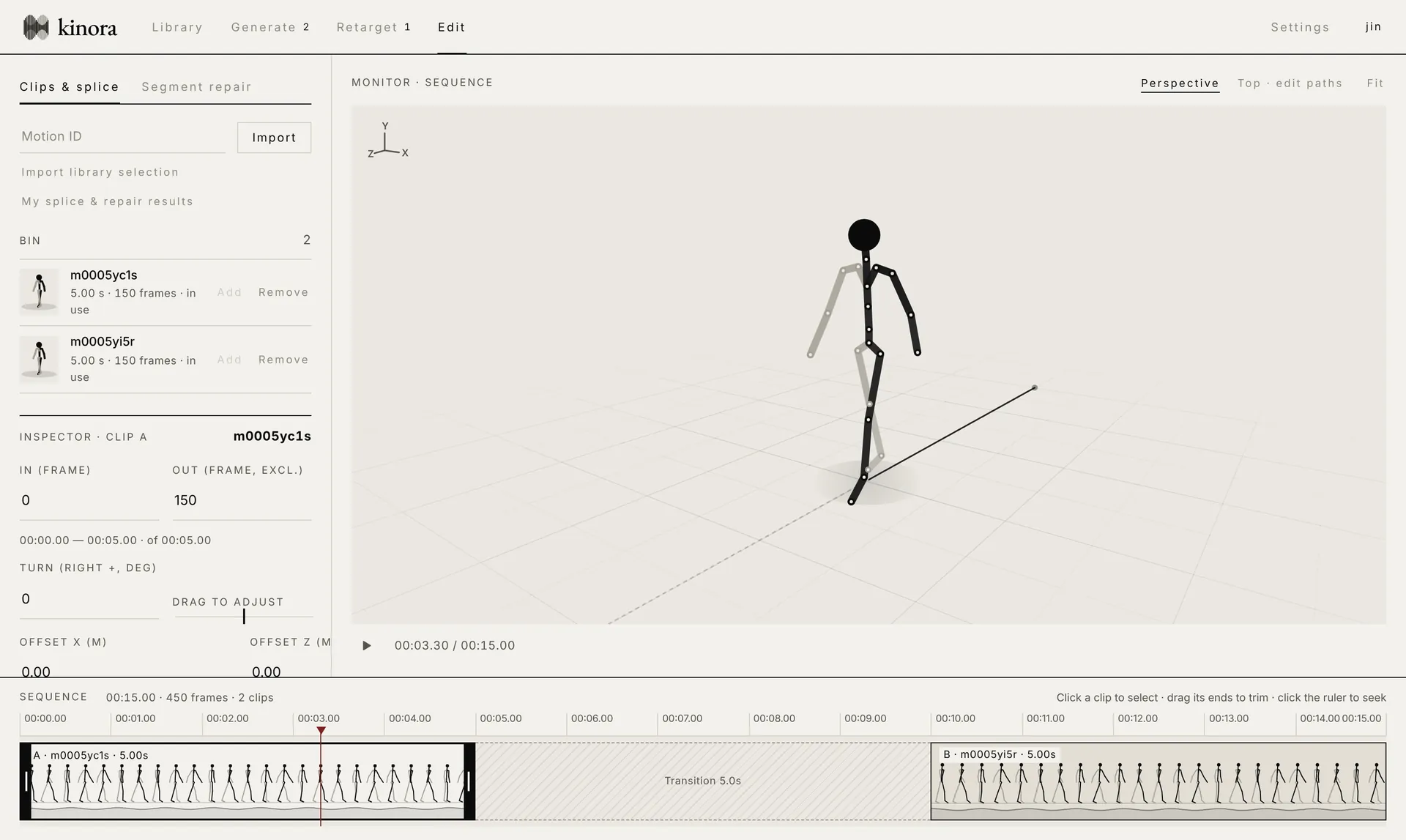
Kinora editor: clip bin and inspector on the left, 3D monitor on the right, and a timeline with two clips and a transition at the bottom

Robot refinement

Fix it at the frame where it fails

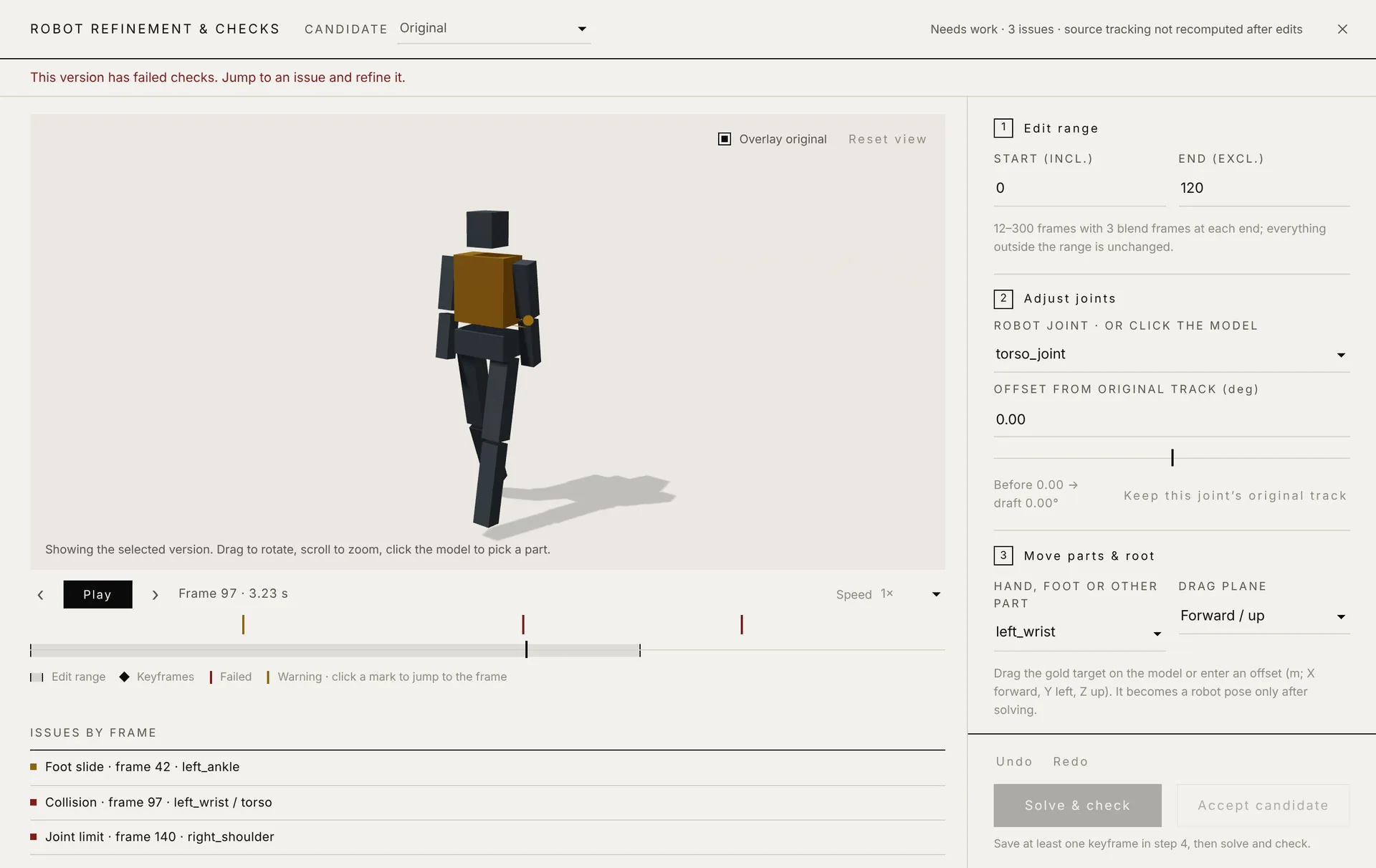
Refinement uses the job's actual robot model. The timeline marks collisions, limit violations, foot slides and other issues by frame; click one to jump there, adjust step by step, and submit for solving.

  • Joint sliders update the robot pose live, with the original version as an overlay
  • Drag hand and foot targets or type offsets; poses blend smoothly between keyframes
  • Candidates are checked for velocity, acceleration, seam jumps, collisions and joint limits; failing ones cannot be exported

Automatic checks are not a safety certification. Validate motions with your robot, controller and environment.

Kinora robot refinement: robot preview and a timeline with issue marks on the left, numbered steps for range, joints, parts and keyframes on the right

Many robots

Built-in robot retargeting with mesh previews. Import URDF, MuJoCo XML or a ZIP with assets, stored per account, and inspect joint limits.

Traceable exports

NPZ keeps the human source data; BVH exports skeletal animation. Multiple motions are packed into a ZIP with a per-item export report, so failures are never silently dropped.

Teams & self-hosting

Password and email accounts, admin tools and Gadget keys. Run the server on your own machines and keep data and backups in your hands.

Get started

Choose how to begin

Desktop

Connect to your team

  1. Download and install the package for your system.
  2. Enter the Kinora server address from your team and sign in with your own account.
  3. Search and preview in the library, then generate, retarget or refine.

The client ships without accounts, models or local GPU inference. Generation, editing and retargeting depend on the connected server's configuration and your permissions.

Install & update guide (Chinese) →

Server

Host your own server

python3 -m venv .venv
.venv/bin/python -m pip install -r requirements.txt
.venv/bin/python scripts/seed_demo.py --root runtime/demo
bash commands/kinora-server.sh doctor --full

The local demo needs only a CPU and lets you check sign-in, the library and previews. Full generation, editing and refinement need the assets, Kimodo and licensed models from the deployment guide, verified with doctor --full.

Server guide (Chinese) →

Agents

Let your agent use Kinora

export MOTIONFARM_URL="https://your-kinora.example.com"
export MOTIONFARM_API_KEY_FILE="$HOME/.config/kinora/api-key.txt"
python3 motionfarm-gadget/motionfarm.py info

Run it as a CLI, or as a local MCP subprocess for Codex or Cursor. Planning stays with the agent you already use.

Gadget guide (Chinese) →
Download

Prebuilt and ready to install

DownloadVersionPlatform
macOS0.7.0Apple silicon and Intel, universal DMGGet DMG
Windows0.7.0Windows 10 / 11, x86_64 installerGet EXE
Linux0.7.0Ubuntu 22.04+ / Debian 12+, x86_64Get DEB
Server source0.5.2The full server, independent human rig and compute queue, with Gadget 0.15.2; model weights, GPU environment and robot assets are installed separatelyGet ZIP
Gadget0.15.2Python 3.10+, CLI / MCPGet ZIP

Desktop SHA-256Server SHA-256All releasesVersions & compatibilityDesktop, server source and Gadget are versioned independently.

Kinora’s own code is licensed under the Apache License 2.0. Third-party components, models and assets keep their own licenses; see NOTICE.

MACOS

Open the DMG and drag Kinora to Applications. The first time, right-click the app and choose Open.

shasum -a 256 file.dmg

WINDOWS

Run the installer. Unsigned installers may trigger SmartScreen; continue only after checking the source and checksum.

Get-FileHash .\file.exe -Algorithm SHA256

LINUX

Install from the download folder with the package manager, which resolves dependencies.

sudo apt install ./file.deb

The installers are not yet notarized for macOS or code-signed for Windows. Download them from this page or GitHub Releases and verify the SHA-256 checksum; if you see an integrity error, do not turn off your system's security protections. Existing users can upgrade in the app under Settings → Check for updates; in-app updates depend on how the connected server is configured.